

Good news for those of our clients who are employers: California’s new retirement savings plan, CalSavers, may be able to offer your employees the opportunity to save for the future without much effort — and at no cost to you or your business.

CalSavers is available to California workers whose employers don’t offer a workplace retirement plan, along with self-employed individuals and others who want to save extra toward retirement. Savers contribute to a Roth IRA (individual retirement account) that belongs to them but is administered by the state. Employers that don’t offer their own plan simply register with CalSavers by the specified deadline and facilitate their employee’s access to the program.
The program benefits both employers and savers:
Benefits for Employers
|
Benefits for Savers
|
Navigating CalSavers for Employers
All California employers with more than five (5) employees must register for CalSavers by the specified deadline regardless of whether they are exempt from the program. (See below for all associated deadlines.)
Deciding whether you must register
Employers that have at least five (5) employees and don’t already offer a workplace retirement plan can register for CalSavers. Employers that have five or more (5-plus) employees must register, regardless of whether or not they offer their own retirement plan:
- If you already offer a retirement plan, you’re not required to participate in the program, but you must register as “exempt.”
- If your business is a nonprofit, you must register like other businesses, unless it is a religious organization, in which case registration is not required.
- Even if all your employees choose to opt out of CalSavers, you must register if you have at least five employees.
Note: If you’re not required to register and you receive a notice from the state informing you of the need to register, you must respond to the notification to avoid any penalty.
Meeting the registration deadline
If you’re required to register, you must do so by the specified deadline:
- By Sept. 30, 2020 (deadline passed) for nonexempt employers with more than 100 employees. If you missed the deadline, register today!
- By June 30, 2021 for nonexempt employers with more than 50 employees.
- By June 30, 2022 for nonexempt employers with five or more employees.
- One full year from the date the business was started for new businesses with five or more employees.
Employee thresholds are based on the average number of employees for the prior year. For 2021, look at your average number of employees for 2020 (based on the Quarterly Contribution Return and Report of Wages (DE 9C) reports you filed with the Employment Development Department [EDD]).
Registering for CalSavers as an employer
If you’re required to register, you should receive a letter notifying you of the registration requirement and providing you with an access code. You can then head to https://employer.calsavers.com where you’ll be prompted to enter your Employer Identification Number (EIN) or Tax Identification Number (TIN) and your access code to start the registration process, as shown below.

If you didn’t receive a notification or access code, or you lost your access code, click the question mark icon in the CalSavers access code box (at https://employer.calsavers.com) to request an access code.
After you register, you’ll be required to enter an employee roster, providing basic employee information such as name, address, phone number, e‐mail address (if available), and external payroll ID (this is all done using an Excel spreadsheet) for each employee.
Warning: CalSavers requires that you keep your employee roster up to date.
CalSavers will then contact your employees — not you — to determine whether they want to opt out, or to request what they want their contribution rate to be (a percentage, not a fixed dollar amount):
- Employees who don’t respond to CalSavers will be enrolled automatically at 5 percent of their gross pay.
- You can view each employee’s contribution rate by logging into your employer’s portal on the CalSavers website.
- If an employee changes the contribution rate, you’ll be notified via e-mail, and the new rate will be posted to your portal.
Meeting your ongoing responsibilities
As an employer, you need not, and should not, answer employee questions about enrollment or participation in the program. CalSavers will communicate directly to employees and will answer any questions they may have. Your responsibilities are limited to the following:
- Keep your employee roster up to date.
- Within 30 days of submitting your employee roster, start collecting, remitting, and reporting contributions for each payroll period. To find out how to do this, visit the CalSavers Employer Resources page.
Avoiding penalties
If your business fails to comply with the CalSavers program requirements, you will be served a notice of noncompliance from the California Employment Development Department and will be subject to a $250 per employee penalty. If you fail to comply within 180 days, the penalty goes up to $500 per employee.
Note: Employers have zero liability for employees’ decisions of whether or not to participate in the program, for their investment choices, or for the performance of their investments.
Navigating CalSavers for Employees
Employees can participate in the CalSavers program regardless of whether they’re employed by a business or are self-employed. If you’re employed by a business that’s required to register with the program, you’ll receive a notification and access code from CalSavers after your employer submits its employee roster. If you’re self-employed, you can enroll in the program yourself.
To get started, go to https://saver.calsavers.com/, click the Start saving button, and follow the onscreen prompts to enroll, as shown below. If you’re an employee, you can use your access code to log in or click Can’t locate your access code? to request one. If you’re self-employed, you can click the Sign up button to get started.
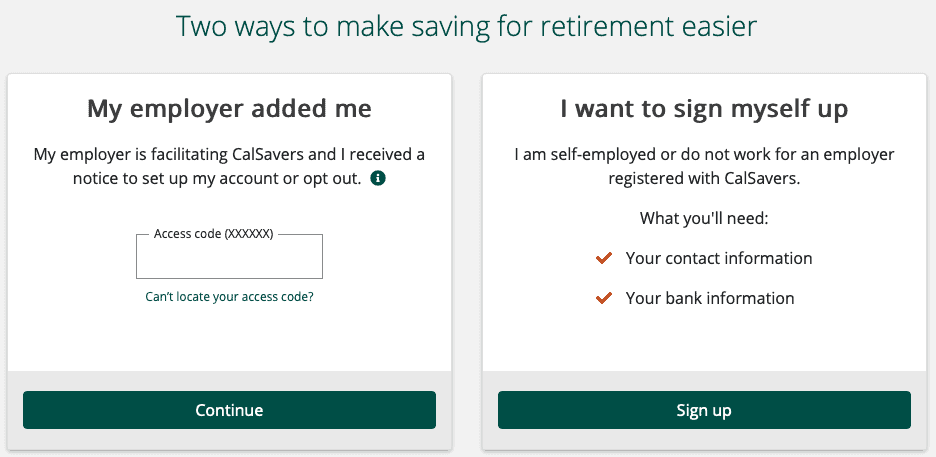
Your initial default contribution rate is 5 percent the first year and increases by 1 percent each year up to 8 percent, but you can log into CalSavers at any time to do the following:
- Opt out or opt back in
- Change your contribution rate
- Recharacterize the account from a Roth IRA to a traditional IRA, so you can deduct contributions from your taxes
- Choose how to invest your money
Pro Tip: As a Saver, you’re responsible for determining your eligibility and contribution limits. For example, you already have an IRA or other retirement plan, you must determine whether making contributions via CalSavers will put you over your contribution maximum for the year.
Whether you’re a California business owner or employee or are self-employed, we can help you understand your benefits and obligations under this new state-administered retirement savings program and simplify the process for enrolling in it. If you’re making contributions to a CalSavers IRA, or any retirement plan for that matter, we can offer guidance on how to use your account to save taxes while maximizing your retirement savings. Simply contact our San Diego tax planning office to schedule an appointment. We can be reached Monday through Friday during normal business hours at (858) 487-4580, or by email admin at steeswalker dot com.
– – – – – – – – –
Disclaimer: The information in this blog post about CalSavers is provided for general informational purposes only and may not reflect current financial thinking or practices. No information contained in this post should be construed as financial advice from the staff at Stees, Walker & Company, LLP, nor is this the information contained in this post intended to be a substitute for financial counsel on any subject matter or intended to take the place of hiring a Certified Public Accountant in your jurisdiction. No reader of this post should act or refrain from acting on the basis of any information included in, or accessible through, this post without seeking the appropriate financial planning advice on the particular facts and circumstances at issue from a licensed financial professional in the recipient’s state, country or other appropriate licensing jurisdiction.
Leave A Comment